


Let me paint you a picture.
You spend hours culling a gallery. You edit every single image with intention: the light, the shadows, the color grading, all of it deliberate. You deliver a beautiful, cohesive set of photos that genuinely moves your client to tears.
Then someone asks for your website link. And you hesitate.
Maybe you rattle it off quickly and hope they don’t look too closely. Maybe you add “it’s a bit outdated” as a disclaimer, like an apology. Maybe you’ve started just saying “oh, I’m in the middle of a redesign” — a redesign you’ve been “in the middle of” for about eight months now.
Sound familiar? (I thought so.)
Here’s the thing: your website isn’t just an online portfolio. It’s doing a job, or it should be. It’s the thing that convinces a couple who found you on Instagram to go from “oh she’s good” to “I need to book her immediately.” It’s working (or not working) 24 hours a day while you’re shooting weddings, editing galleries, or finally taking a day off.
And if it’s not doing that job well? You’re losing dream clients to photographers whose work isn’t even as good as yours.
So let’s talk about it. These are the most common photography website mistakes I see — and what to do instead.
Mistake #1: Leading with your name instead of your value
This one is SO common and it makes sense why — your name is your brand, right? So it feels natural to open with “Welcome to [Name] Photography.”
But here’s the thing. When someone lands on your homepage, they have exactly one question: is this person right for me?
“Welcome to Sarah Jones Photography” answers exactly zero percent of that question.
Your hero section — that first thing people see before they scroll — is prime real estate. It needs to tell your ideal client who you are, who you’re for, and what makes you worth hiring. In about 10 words or less.
Something like: “Intimate elopement photography for couples who want real over posed.” That’s a statement that makes the right person lean in and the wrong person click away, which is exactly what you want. (You do not want to photograph every couple who lands on your website. You want YOUR couples. Let the site do the filtering.)
Mistake #2: A gallery that shows everything instead of only your best work
More is not more. I promise.
I know it’s tempting to include every wedding, every style, every season — because you worked hard on all of it and it all represents you. But a portfolio that tries to show everything ends up communicating nothing.
Your gallery should only show the work you want more of. If you’re trying to attract moody, editorial couples and half your portfolio is bright and airy — guess which inquiries you’re going to get? (Yep. The bright and airy ones.)
Edit ruthlessly. Fewer images, more impact. A gallery of 6 absolutely stunning, cohesive galleries will convert better than 20 galleries of mixed styles every single time.
Ask yourself: if I only ever shot weddings that looked like this, would I be happy? If yes, keep it. If not, take it out.
Mistake #3: An about page that reads like a LinkedIn bio
“Hi, I’m [Name]! I’m a wedding photographer based in [City] with a passion for capturing your special day.”
I want to say this with the most love possible: no one cares.
Not because you’re not wonderful. But because that sentence tells your potential client nothing about why you specifically are the right photographer for them. It’s the same sentence on 10,000 other photography websites.
Your about page is actually a sales page. It’s where your dream client decides whether she trusts you enough to put you in charge of one of the most important days of her life. That trust doesn’t come from a list of your credentials. It comes from connection.
Write like a human. Share your actual perspective on what you do and why it matters. Mention the thing you notice at every wedding that no one else does. Be specific enough that someone reads it and thinks oh, she gets it.
That’s the about page that books clients.
Mistake #4: Hiding your pricing (or not having a services page at all)
Okay, I know this is a polarizing one. A lot of photographers don’t want to put prices on their website, and there are arguments for that approach. But hear me out.
When someone visits your website and can’t find any pricing information, the most common response isn’t “I’ll reach out to ask.” It’s “I’ll just keep looking.”
Your dream client — the one who values your work, has a realistic budget, and is genuinely excited about your style — she wants to know if this is even a conversation worth having before she sends an inquiry. If she can’t get even a general sense of your pricing, she might assume you’re out of her range and move on. Or worse: she inquires, you quote her, and she’s shocked because there were no expectations set.
You don’t have to publish exact packages. But “starting from” pricing, or a clear sense of your investment range, does a lot of work. It saves both of you time and attracts the clients who are already in the right ballpark.
Mistake #5: A contact page with zero personality
Your contact page is the last thing someone sees before they decide whether to hit send. And most contact pages are just… a form. Maybe a quick “I’d love to hear from you!” and then: name, email, message, submit.
Technically fine. Strategically a missed opportunity.
Your contact page should do a few things: get them excited about reaching out, tell them what to expect after they do (do you reply in 24 hours? 48?), and maybe give them a little nudge if they’re on the fence. It can also do some light filtering — asking what their wedding date is, or their rough budget — so you’re getting inquiries that are actually relevant.
A contact page with some warmth and intention converts so much better than a blank form floating in space. Don’t let it be an afterthought.
Mistake #6: A website that looks beautiful but loads at a snail’s pace
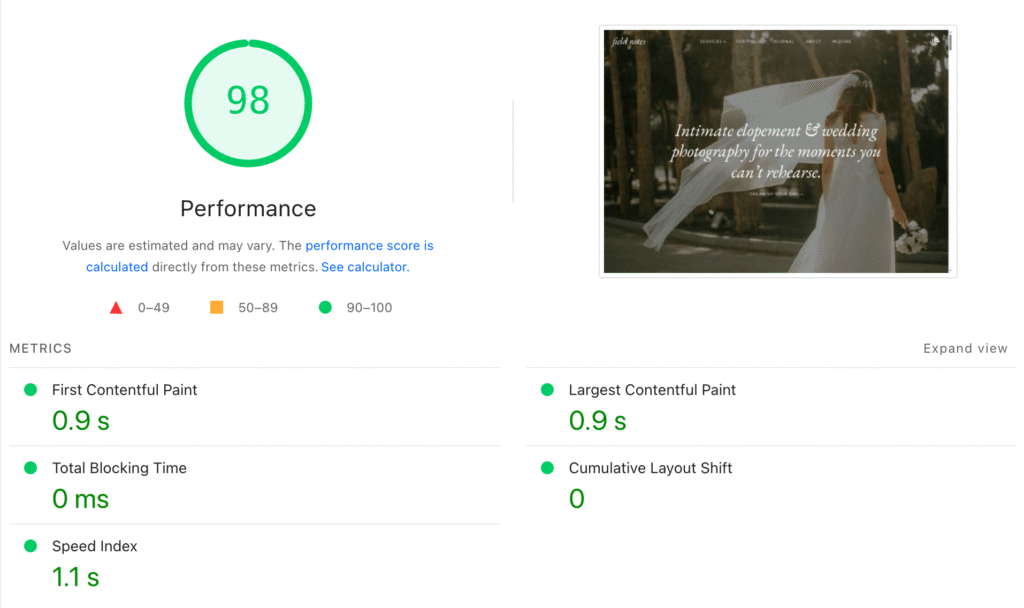
98/100 on PageSpeed Insights. Yeah, we’re pretty happy about that. ☕️
This one isn’t glamorous but it matters enormously.
If your website takes more than 3 seconds to load, a significant chunk of your visitors leave before they’ve even seen your work. And honestly? I can’t blame them. We are all impatient on the internet.
The most common culprit for slow photography websites: images that haven’t been optimized for web. A full-resolution image straight from Lightroom is huge. A properly exported web image is a fraction of that size and looks virtually identical on screen.
Before you do anything else, go check your page speed with Google PageSpeed Insights — it’s free and takes about 30 seconds. If your score is below 70, image optimization is almost certainly the first fix.
(Side note: this is also one of the reasons I’m obsessed with Showit. When it’s set up correctly, it’s genuinely fast. The platform isn’t the problem. How images are handled usually is. If you’re still figuring out which platform is even right for you, I wrote a full breakdown of Showit vs Squarespace for photographers that might help.)
Mistake #7: No clear next step for visitors who aren’t ready to inquire yet
Here’s the truth: most people who land on your website are not going to inquire on their first visit. They’re browsing. They’re comparing. They might love your work but not be ready to commit to a conversation.
If your website’s only CTA is “contact me,” you’re leaving a lot of potential clients in the void. They close the tab, life happens, and they forget about you.
A simple fix: give people a reason to stay in your world even if they’re not ready to inquire. An email list with something genuinely useful — a wedding planning guide, a shot list, a document that makes their life easier. Something that keeps you in their inbox so that when they ARE ready to book, you’re the first person they think of.
It doesn’t have to be complicated. It just has to exist.
So… are any of these photography website mistakes showing up on your site?
Read through that list and felt a little seen? (It’s okay. We’ve all been there.)
The good news is none of these are permanent. A website that’s not working yet is just a website that hasn’t been fixed yet.
If you’re ready to start from something that already has all of this built in — strategic layout, conversion-focused structure, SEO baked in from the start — that’s exactly what my Showit website templates are designed to do. No starting from a blank page. No guessing what goes where. Just a site that’s already set up to do the job, ready for you to make it yours.
Or if DIY isn’t your thing and you’d rather just hand it off entirely, the Template Customization Service is exactly that — your template, set up and ready to launch in about a week, without you touching a single thing.
Either way: your website should feel as good to send as your galleries do.
You’ve done the work. Let your site show it. ✨
xx, Kim
Written by Kim Preis

Published on March 25, 2026


